Blog
Inside Tactic Remote 1.14: capability gating, non-interactive Git, and split-push recovery
Why Git write controls stay hidden against 1.13 hosts, how non-interactive SSH preserves custom keys without hanging, and why Commit & Push handles partial failure as two states.
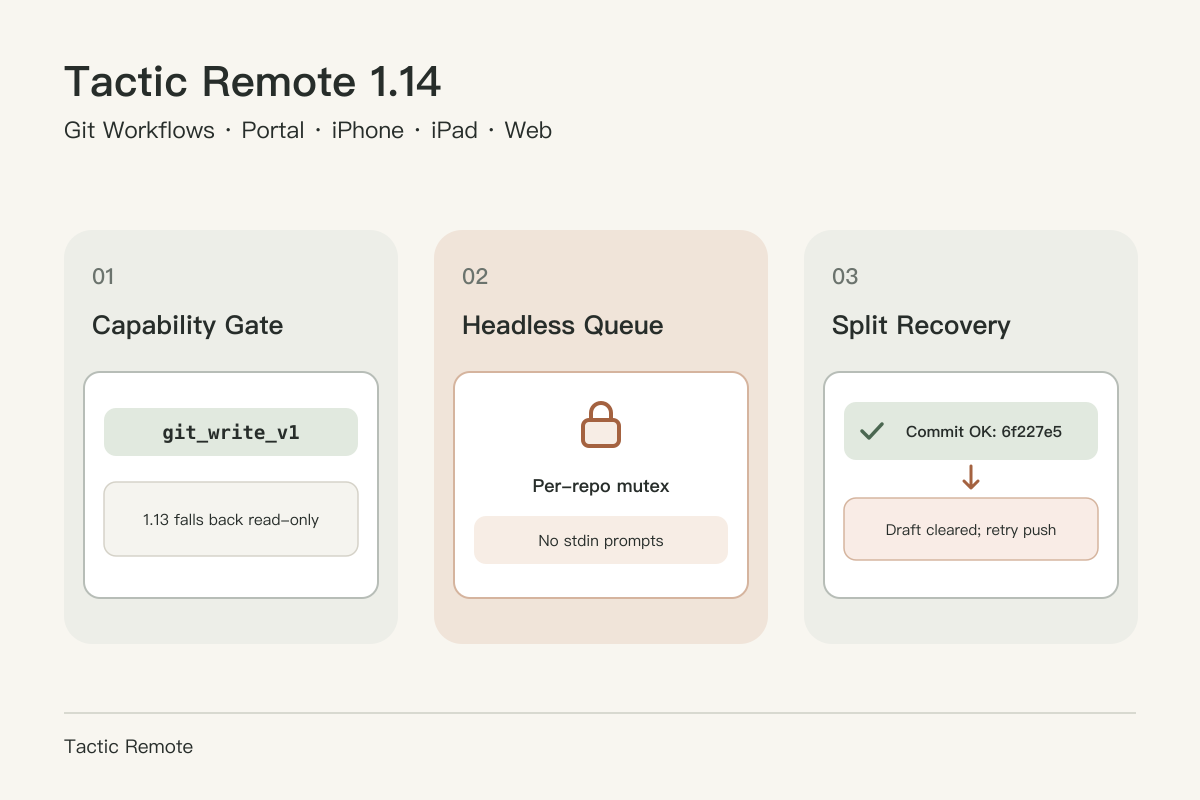
Running an echo test or writing a commit from your computer terminal takes seconds because Git can ask questions interactively: a passphrase prompt, an SSH host-key check, a fallback editor, or a clear terminal output showing whether commit finished before push failed.
Moving Git write controls to an iPhone, iPad, or Web App changes every part of that interaction model. Tactic Remote 1.14 introduces write operations through the host companion without giving up terminal safety or breaking mixed-version compatibility.
This engineering companion accompanies the 1.14 release announcement. For step-by-step usage and troubleshooting, see the Mobile Git Workflow Guide.
1. Negotiating git_write_v1 without bumping protocolVersion
Users upgrade clients and computers at different times. Phone updates arrive through the App Store while desktop apps, CLI installs on Linux servers, or Windows companions update separately. Rather than locking out older hosts or bumping protocolVersion above 2, 1.14 adds an additive capability string: git_write_v1.
When the host companion starts and detects a usable git binary in its runtime environment, it advertises git_write_v1 alongside git_review. Both iOS 1.14 and Web App 1.14 inspect that capability list on connect:
- If
git_write_v1is present, the Review panel renders branch controls, Pull/Push actions, commit inputs, and staging toggles, and consumes extra repository state (upstream,ahead,behind,head_commit,operation_state,author_configured, and unbornHEAD). - If the host runs 1.13.x and omits
git_write_v1, the 1.14 client keeps the exact read-only review panel without showing dead buttons or intrusive upgrade alerts.
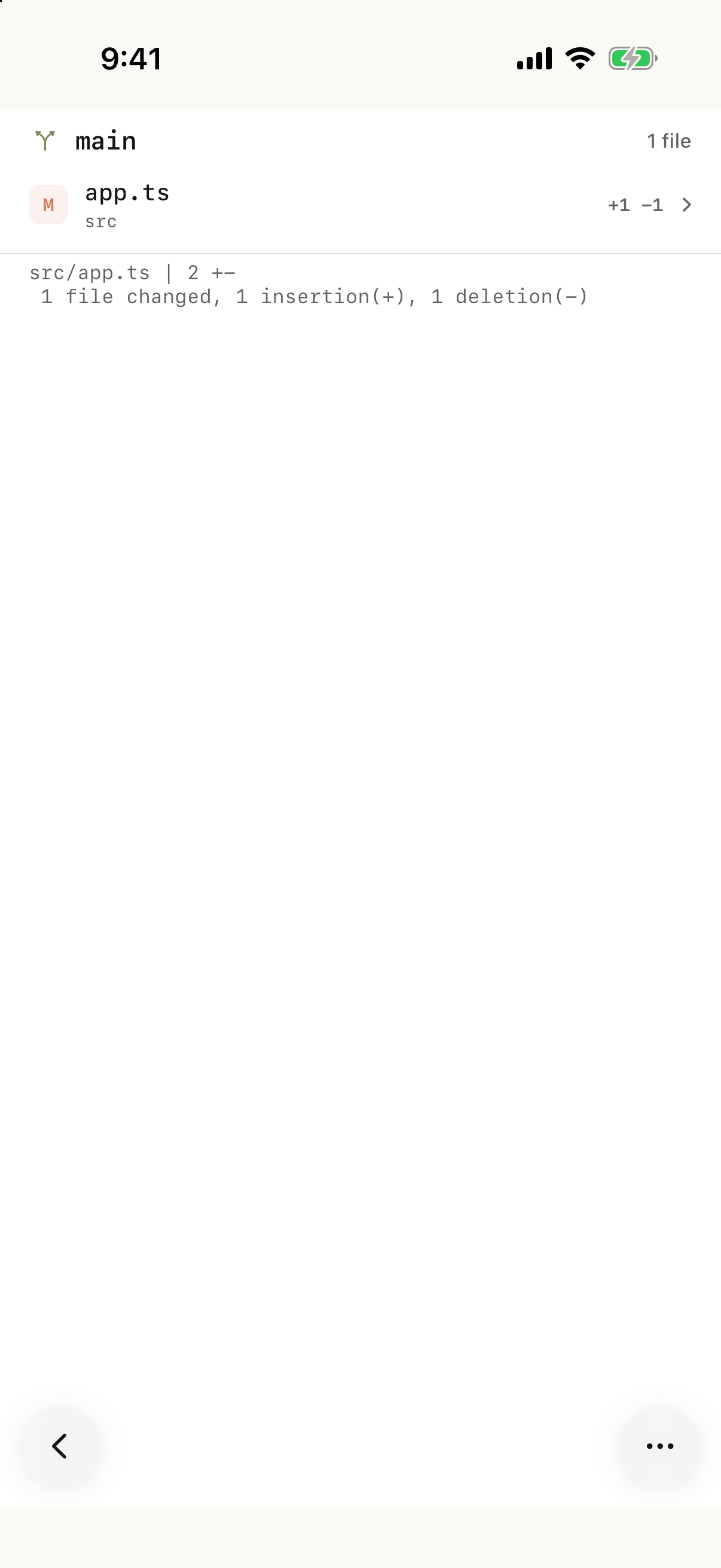
iOS 1.14.0 (51) simulator capture paired against a 1.13.1 Mac host on demo-repo. Review lists changed files and diffs cleanly while omitting write controls.
2. Non-interactive execution, SSH config preservation, and per-repo locks
A remote host server cannot pause behind a WebSocket RPC to ask stdin for an SSH passphrase, a Git credential manager dialog, or a default vi commit-message prompt. Every Git child process spawned by the host Git service runs with explicit non-interactive guards: GIT_TERMINAL_PROMPT=0, non-interactive GCM_INTERACTIVE, GIT_EDITOR=true, and LC_MESSAGES=C.
Network operations (push, pull, and hook-backed commit/checkout) handle SSH carefully. Because Git selects SSH in strict precedence (GIT_SSH_COMMAND > core.sshCommand > GIT_SSH > ssh), unconditionally forcing a custom environment variable would silently override a repository's dedicated deploy key, ProxyCommand, or agent wrapper. Instead, 1.14 checks whether GIT_SSH_COMMAND, GIT_SSH, or git config --get core.sshCommand is already defined. Only when none exists does the host apply:
The trade-off is explicit: StrictHostKeyChecking=accept-new allows the very first non-interactive push to a newly added remote host to trust and record its host key without stalling forever, while still rejecting any changed key for an already-known host. Users who prefer strict manual fingerprint verification before first contact can pre-populate known_hosts or define core.sshCommand.
All write RPCs (git_stage, git_unstage, git_discard, git_commit, git_push, git_pull, git_branch) are additionally serialized per repository root using an in-process mutex, bounded within the workspace base path, and checked against sensitive-path challenges. If an external terminal process or agent still holds .git/index.lock, the failure returns to the UI immediately as a dismissible banner—including inside file diff detail views, not only on the main list.
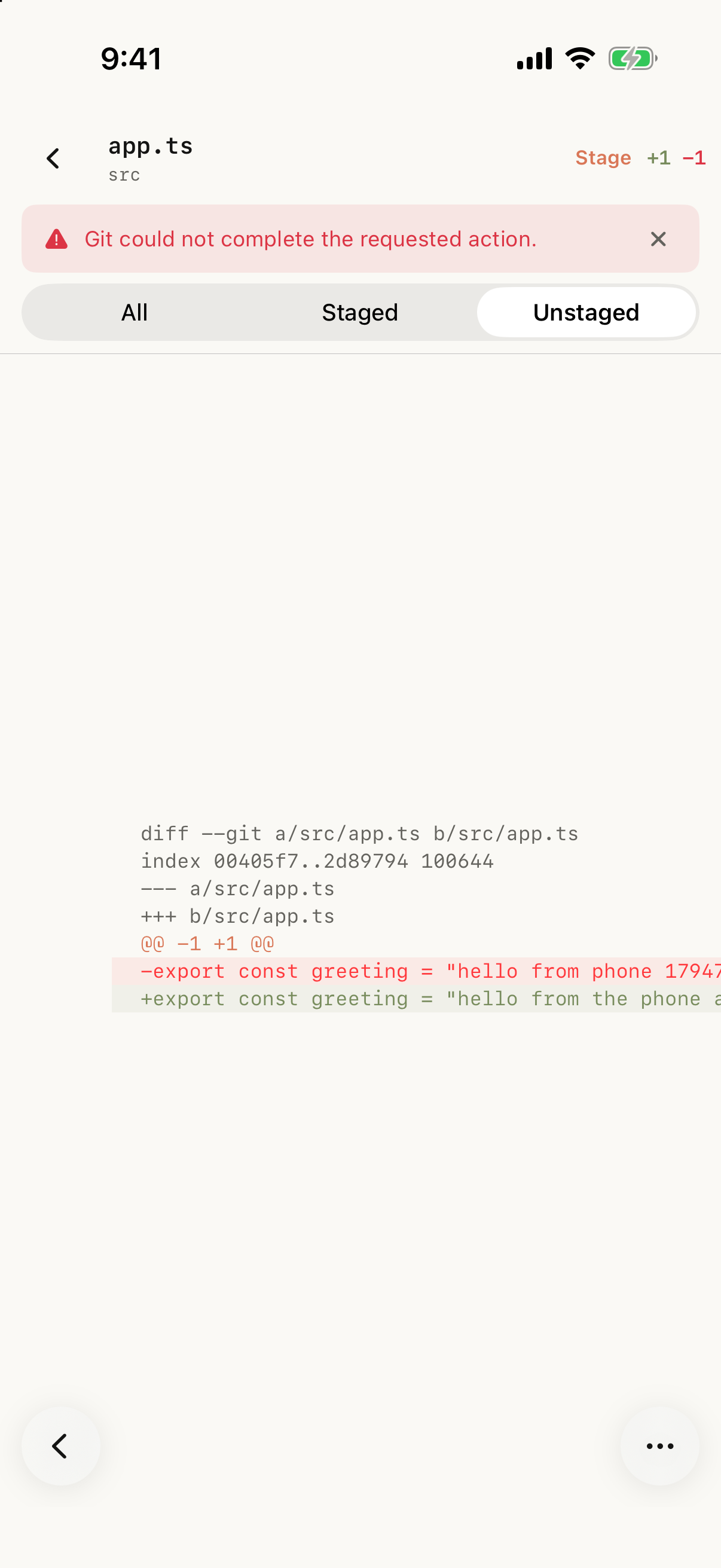
Simulator verification capture with a simulated .git/index.lock contention on src/app.ts. Tapping Stage in the detail view surfaces a dismissible error banner without losing scroll position.
3. Bounded 5,000-entry reviews vs. complete write validation
Repositories sometimes contain large un-ignored build outputs or node_modules trees. Listing 50,000 untracked paths over a mobile WebSocket frame would stall rendering and blow message buffers. In 1.14, git_review lists up to 5,000 entries: once the status crosses that limit, large untracked directories (>200 entries) collapse into single directory rows, and if the count remains above 5,000, the first 5,000 rows are returned alongside an additive too_many_changes flag. Older clients ignore that flag while rendering the bounded list.
Crucially, write validation reads the complete Git index and status (up to 16 MiB) rather than trusting the truncated display summary, ensuring staging or path checks match actual repository state. Scoped git_file_diff requests (head, staged, unstaged) remain separated cleanly from write mutations and cap diff payloads at 120 KiB by default.
4. Why "Commit & Push" is modeled as two states
From a phone tap, "Commit & Push" looks like one button. In Git, it is two sequential operations with different durability:
git commitcreates a local commit object and advancesHEAD.git pushtransmits objects over the network and updates a remote tracking ref.
If commit succeeds locally (6f227e5) and push fails—because the repository lacks a remote, SSH credentials need attention, or the remote has diverged—returning a generic "Operation failed" leaves the user guessing whether the commit happened. Keeping the typed commit message in the input box would encourage tapping "Commit & Push" a second time and creating an unintended empty or duplicate commit.
Instead, 1.14 reports the split outcome directly: the banner records the created short commit hash and push failure reason, the ahead badge updates (↑1), and the draft box clears so the user can fix the network/remote issue and tap the standalone Push button cleanly.
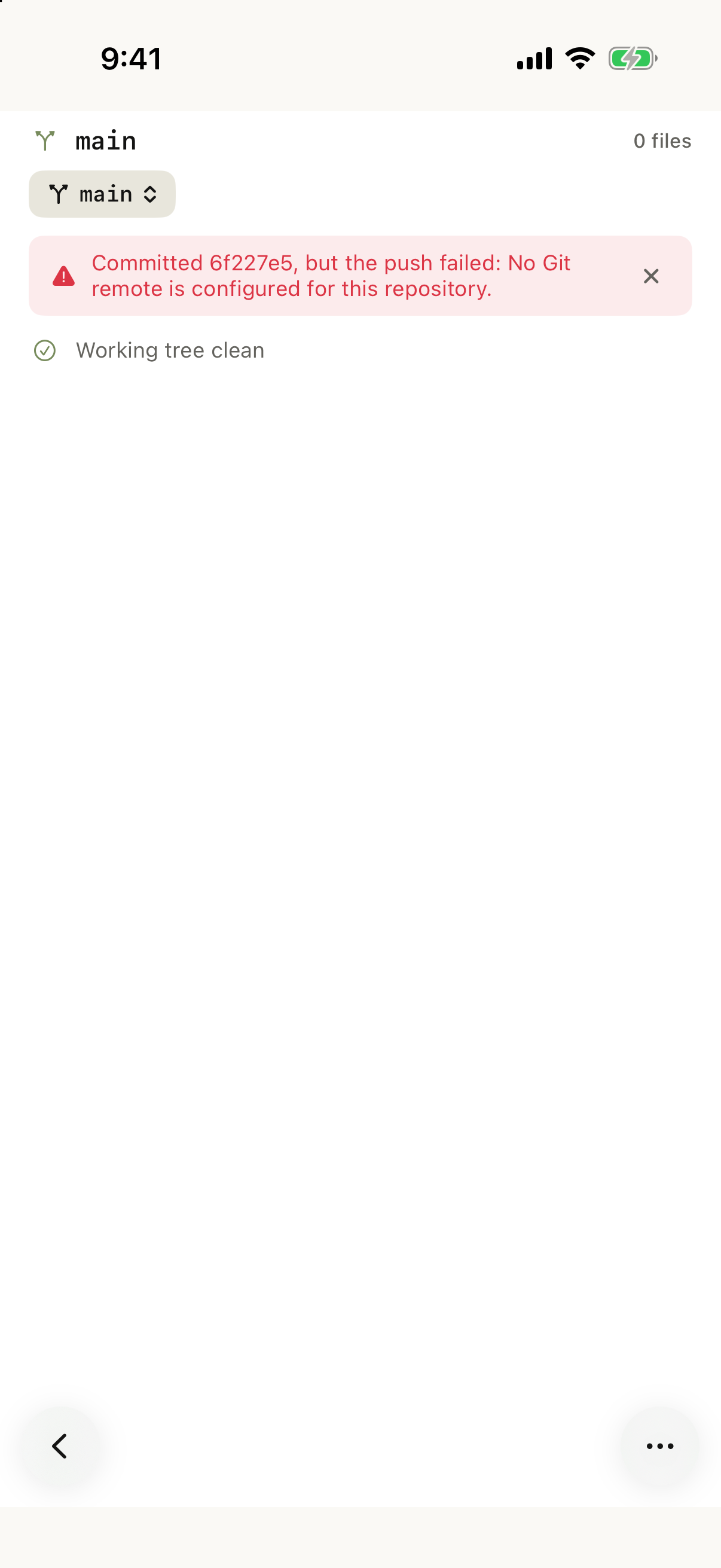
Simulator verification capture demonstrating partial-push recovery on a repo without a configured Git remote. Both iOS 1.14 and Web App 1.14 implement matching split-failure state.
5. Clearer worktree and deletion guardrails
Raw Git stderr was designed for local shells, not mobile alerts. Across iOS and Web App 1.14, five common edge cases map to explicit guardrails and localized prompts:
- Missing upstream on Pull: instead of reporting "no remote configured", pulling a local-only branch prompts you to push once first to establish upstream tracking.
- Dirty worktree blocking branch switch or Pull: if uncommitted edits conflict with the target branch, switching returns a clear instruction to commit, stash, or discard local changes rather than surfacing a misleading "merge conflict" error.
- Detached
HEADprotection: the Push control disables whenHEADis detached so you know to switch onto or create a named branch before pushing. - Untracked file deletion confirmation: unlike
git checkouton tracked files (which restores fromHEAD/ index), removing an untracked file or directory permanently deletes it from disk, so the menu and confirmation dialog explicitly read Delete untracked file/folder and state that the action cannot be undone.
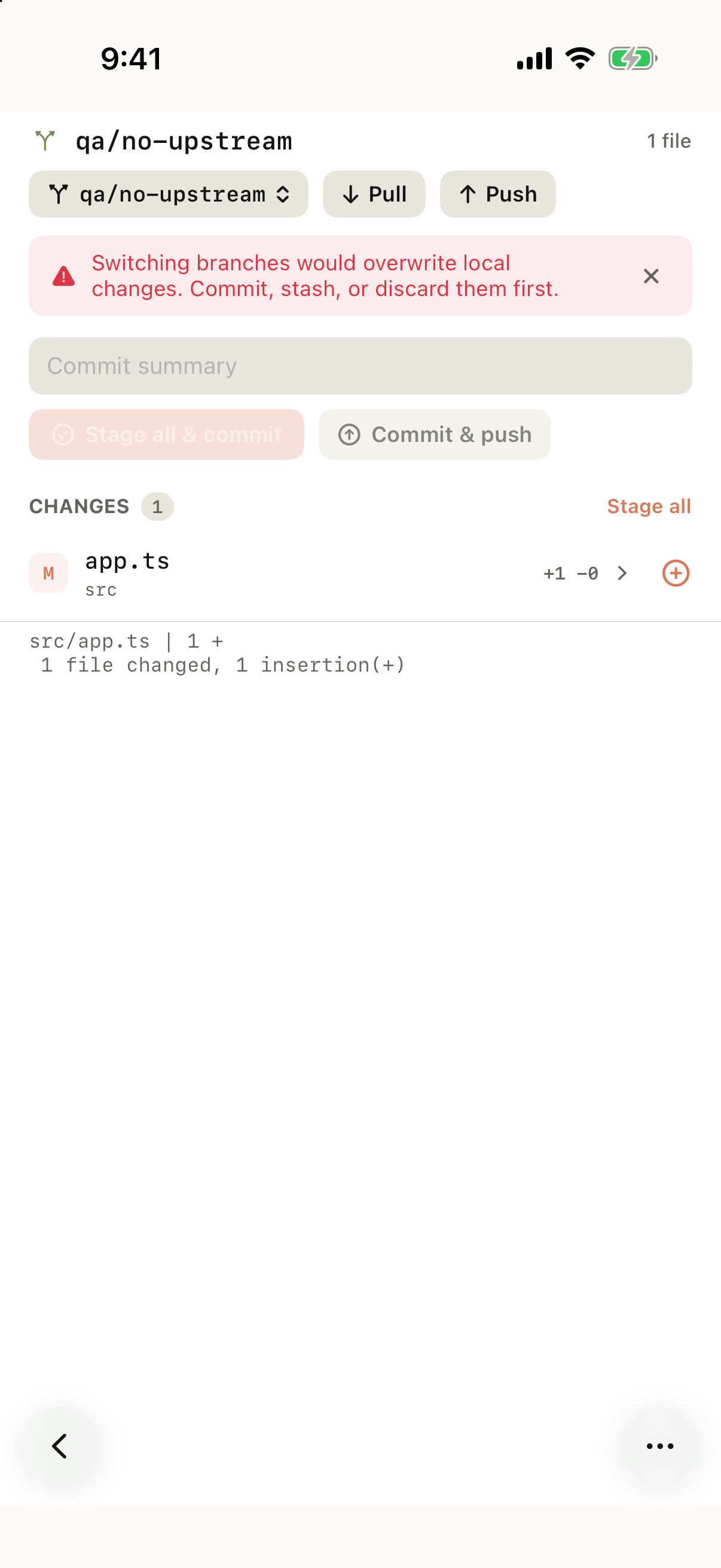
Simulator capture showing dirty-worktree guard when attempting to switch branches over conflicting uncommitted edits in demo-repo.
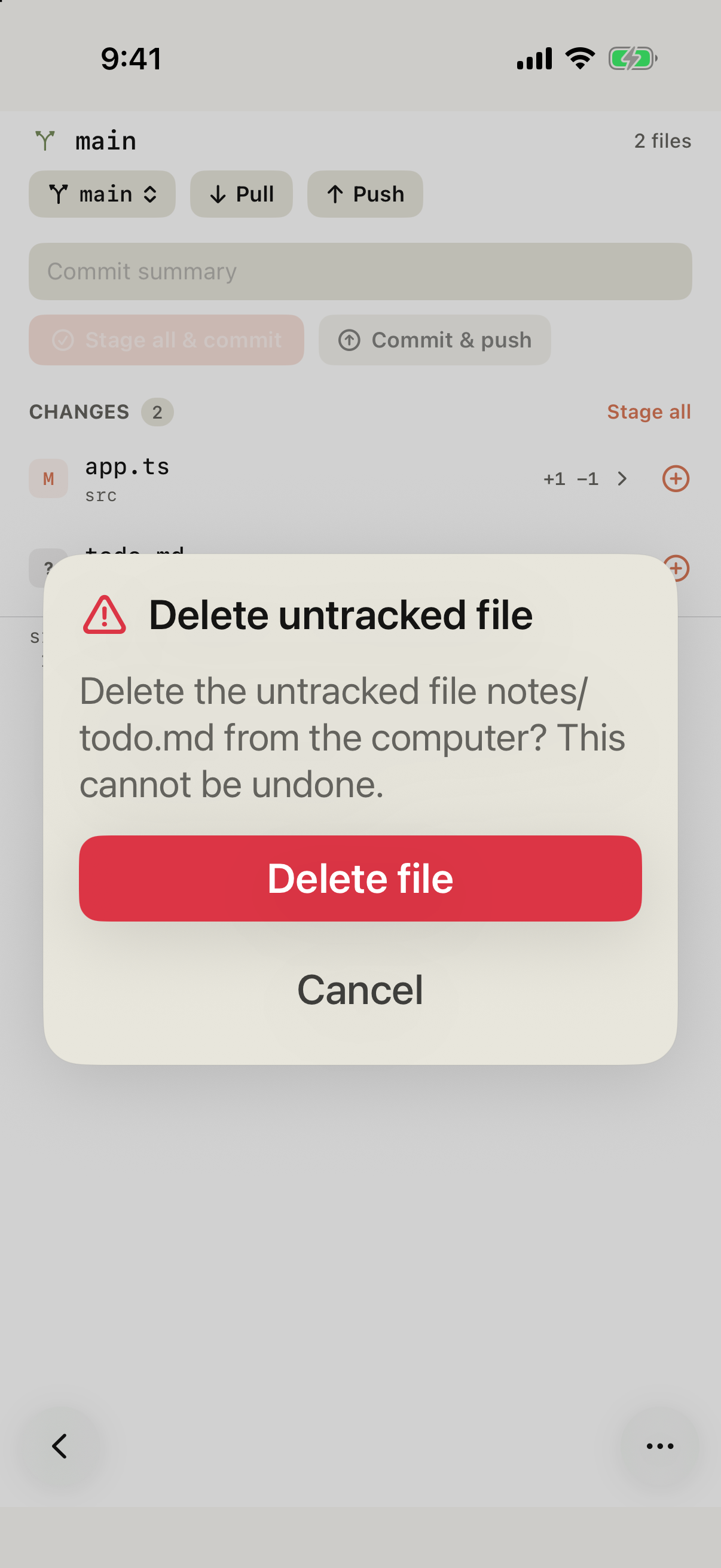
Simulator capture showing the explicit Delete confirmation when discarding an untracked file in demo-repo.
6. Default Portal on Tactic Relay & verification boundaries
In 1.14.0, Tactic Relay hosts enable Portal local site discovery and private previews by default (including existing Mac installs upgraded to build 34). Because private previews are bound to your authenticated Tactic account and do not submit traffic to automated moderation, removing the extra host toggle reduces friction between finishing an agent edit and checking it on a phone screen. Creating a public visitor share link remains an opt-in confirmation requiring supported-region checks, link expiry selection, and explicit content moderation consent.
As with prior releases, boundaries remain explicit: interactive multi-commit rebase flows and manual 3-way conflict marker editing belong in an Agent session or the Native Terminal rather than the quick Review toolbar. The screenshots above were captured on November 16, 2026 against an isolated demo-repo during multi-platform simulator, Web App Chromium, Mac build 34, Windows Preview, Docker LinuxServer, and four-architecture CLI verification.
Try Tactic Remote
Control your coding Agents from your phone
Connect to Claude Code, Codex, and other Agents on your Mac, Windows, or Linux computer. Check progress and send the next instruction from iPhone or iPad.