Blog
Inside Portal: finding the website and deciding who can see it
Why a detected port is not a verified project, and a private preview is not a share. Real UI and concrete examples explain Portal’s design choices.
Follow product and engineering updates from this channel.
Browse categorySuppose two projects are running on your computer: one website listens on port 3000, the other on 5173. A port that opens on your phone is not necessarily the website for your current conversation. And even after choosing the right site, another question remains: who is allowed to view it?
Portal is organized around those sequential decisions. It helps you identify a target, establish your own private preview, and only then consider external visitor access. Because localhost always refers to the device opening the link, pasting your computer's local address into a phone browser does not move the website there. Portal bridges the connection to the site still running on your computer while making every security boundary explicit.
This article is the engineering companion to the 1.13 announcement. The walkthrough covers UI controls and troubleshooting.
Discovery is a recommendation, not permission
The 1.13 host examines local listeners, associates processes with project directories where possible, and probes candidate ports with an HTTP HEAD request. HTML responses and redirects can identify a website; a JSON API response alone is not enough. Discovery does not run the project, open a preview or create a public link.
Known listeners belonging to another project and agent control services are excluded. If the process directory cannot be verified, a website may be marked Project not verified. That label is not proof of ownership or safety. Check the port yourself. Process inspection and permissions vary by platform; manual port selection remains necessary in some environments.
The important distinction is between finding a plausible target and authorizing access to it. Project matching is not an operating-system sandbox and cannot make untrusted project code safe.
Why “Project not verified” remains an option
In the two-project example, a listener known to belong to the other project should not be recommended for this conversation. If the system cannot supply enough process-directory information, a reachable port should not be described as a verified project either. The list therefore keeps uncertainty visible and lets you check the actual development port before choosing it manually.
That asks for an extra check, but avoids a misleading outcome: opening a perfectly ordinary page and assuming it contains the current agent's edits. The historical device image shows exactly this uncertainty, not successful automatic project matching.
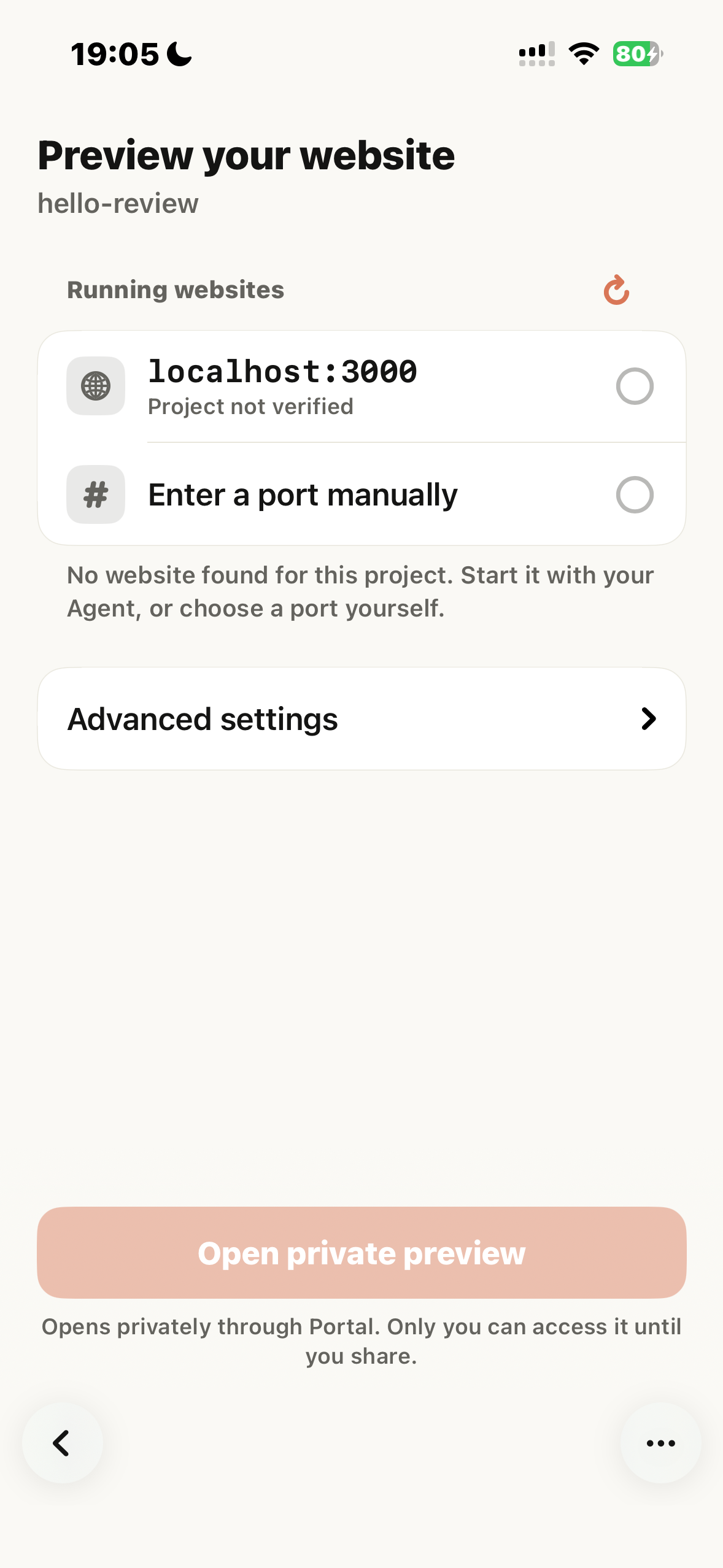
Original English iPhone 15 capture, October 29, 1.13 Build 45, connected to the earlier Linux 1.13 test host. The listener was found but project ownership was unverified. This is not a new test of the final Mac or Windows packages.
The computer serves the page; Portal carries the requests
The computer companion makes an outbound connection to the Portal gateway. Requests for the selected website are relayed back to its loopback listener. This avoids asking the user to expose the development server directly to the Internet. It does not deploy the site, keep a sleeping computer online, or remove the website's own authentication requirements.
Private preview access is tied to the signed-in owner. The gateway is part of this data path: “private” describes who may open the preview, not a promise that every byte bypasses infrastructure or is hidden from it. Configured local backend services can be part of the preview too; inspect what the application exposes before sharing.
For example, the frontend may open while a local API is stopped, leaving the form unable to submit. Portal carries requests to existing services; it does not supply a missing backend or create a durable copy of the application. Diagnose from the last working point: the site on the computer, then the preview, then the particular request inside the page.
Browser sessions and project isolation solve different problems
The in-app preview uses a non-persistent web data store, separate from Safari. It is not a way to inherit Safari's signed-in cookies. Likewise, a project's detected port does not grant access to every other project or local service.
A familiar symptom is being signed in on the computer or in Safari while seeing a login page inside the app. This does not necessarily mean discovery or forwarding failed: the embedded browser has its own web session. Check the site's sign-in requirements in the preview with appropriate test accounts and data, rather than copying personal browser cookies or secrets into the project.
Likewise, two worktrees can have separate development servers. Choosing a project helps identify the preview target; it does not automatically isolate their directories, shared databases or processes from one another.
Sharing changes the audience and the data flow
Creating a share link is an explicit, separate action taken after opening a private preview. The owner must consent to OpenAI content review and select an expiration window ranging from one hour to seven days. Shared pages, scripts, and images pass through this review pipeline before being displayed to visitors. Private preview traffic is never submitted to the sharing review pipeline.
Automated review may reject content or fail to complete. Realtime streams and unsupported media formats can still be used in private previews, even if they cannot be made shareable. Sharing is also subject to regional availability; a regional restriction is never a reason to weaken application security settings. External visitors only need the share link and must accept the visitor notice—no Tactic account is required.
Stopping a share immediately revokes visitor access while allowing your private preview to continue. Stopping the preview terminates both. Keep in mind that link expiration or manual revocation cannot undo or recall content a visitor has already viewed or copied.
Why sharing is separate from opening a preview
Inspecting your own unfinished form only involves owner access. Handing a link to a colleague requires a fresh look at which pages, scripts, images, and configured local services they might reach. Keeping sharing as a separate step ensures you explicitly confirm link expiration and review consent before expanding the audience. The settings screen below brings the private status, review scope, and link creation together in one place.
If a colleague only needs to check a button's alignment, serve a page without real records and choose a short expiration. Even if a page passes content review, you remain responsible for ensuring no test credentials or administrative tools are exposed. Content review determines whether material can be displayed—it does not audit or certify that your underlying application is secure.
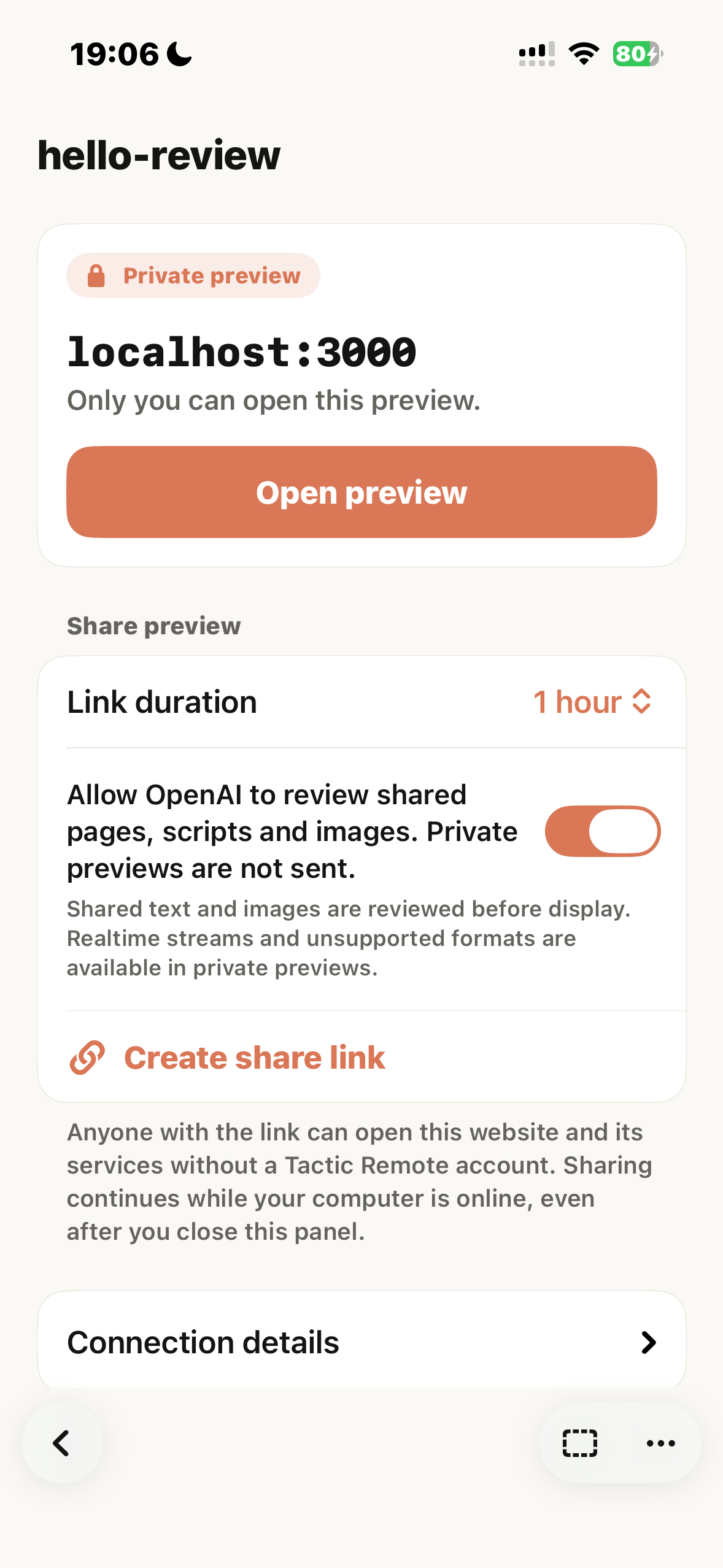
Share settings from the same historical real-device test. The UI distinguishes private preview from sharing review. This editorial revision created no new share or review request.
Reconnection is bounded recovery
The released 1.13 host source has a two-minute window for retaining and attempting to resume a shared preview after its Portal connection drops. This is not guaranteed uptime: the host, development server and gateway must still be able to restore the preview. A gateway restart, expired link, explicit stop or exhausted window can end it. During recovery, a visitor may not receive the page.
An October 29 real-device test found that a brief Relay disconnection ended a share on an earlier 1.13 host. The later host source adds bounded recovery. The earlier device screenshots therefore demonstrate the workflow, not successful recovery on the final Mac or Windows package.
Read the current preview state when the phone reconnects. If it has ended, decide whether to recreate it; an old screenshot or a link in history is not evidence that it is online.
What we verified, and what remains
Historical 1.13 Build 45 device records cover private preview, consent, visitor access and revocation against a Linux sandbox. An earlier recorded local check exercised the released discovery module against an isolated HTML server and JSON endpoint: HTML was found, JSON was rejected, and the website probes used HEAD. Listener inventory and project-directory mapping were supplied for those owned test servers, so this was not a full process-discovery or mobile test.
Final Mac/Windows-to-phone recovery and platform-specific site compatibility remain separate acceptance work. Mac and Windows downloads, the npm CLI and Homebrew are at 1.13. See the compatibility table before choosing a host.
Try Tactic Remote
Control your coding Agents from your phone
Connect to Claude Code, Codex, and other Agents on your Mac, Windows, or Linux computer. Check progress and send the next instruction from iPhone or iPad.